
Windows セットアップ時に使える隠し機能
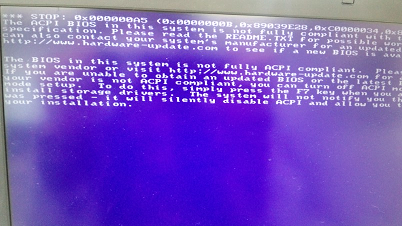
Windows 2000を最新のPCにセットアップしていたら、 STOP: 0x000000A5 (0x0000000B, (以下略)
が発生。
| STOP: 0x000000A5 The ACPI Bios in this system is not fully compliant to the specification. Please read the readme.txt for possible workarounds, or contact your system vendor for an updated bios. The bios in this system is not fully ACPI compliant. Please contact your system vendor for an updated bios. If you are unable to obtain an updated bios or the latest bios supplied by your vendor is not ACPI compliant, you can turn off ACPI mode during text mode setup. To do this, simply press the F7 key when you are prompted to install storage drivers. The system will not notify you that the F7 key was pressed – it will silently disable ACPI and allow you to continue your installation.” |
どうやら、_EJD 文字列に未対応のものがあるらしい
インストール中に “STOP 0x000000A5” が表示される
そういえば、 acpi.sys が古いままだった
コンピューターの実行中に Windows 2000 ベースのポータブル コンピューターをドッキング ステーションにドッキングするとエラー メッセージ「stop エラー 0xA5」
F7を押すと、HALのACPIは標準のものを読んで、処理をスキップしますと書いてるんだけど、よく知られたF6以外に何があるんだろう?
Windows セットアップ時に使用できるファンクション キーの概要
というわけで、調べてみたよ
| F5 – コンピュータの種類や HAL (Hardware Abstraction Layer) を選択する場合に使用します。 F6 – サードパーティ製 SCSI やホスト コントローラ ドライバをインストールする場合に使用します。 F7 – ACPI (Advanced Configuration and Power Interface) を使用せずにセットアップを実行する場合に使用します。 最初の入力待ちで使えるコマンド F2 – 自動システム回復 (ASR) プロセスを自動起動させる場合に使用します。 GUI MODEで使えるコマンド |
結構いろいろありますね。
そういえば、 F2は XPのセットアップ中に表示されたような気がするね ・ω・






 Translate
Comments